The EuroCMS EuroEditor
This allows you to edit and modify content on the page.
Need to request permissions from the content table to view and edit the content.
The content table needs to have an edit button, that'll push to the EuroEditor. The rights and permission for this needs to be enabled.
Check out: https://github.com/mdn/browser-compat-data
Document.execCommand is deprecated. Writing JS code that'll do what execCommand can do out of the box, takes time.
Alternative is to use markdown, and convert it to readable code? Live convert?
<?php
$count = '0'; $content = '<p>Test</p> <p>Kaas</p>';
$max_number = substr_count($content, '<p>');
echo "$content\n";
echo "$max_number\n";
echo str_replace('<p>','<p id="1">',$content);
Contemplate
- Cross module rights permissions?
EuroEditor Group/Users? Add any module into this group that want permissions?
Or requests permission directly. Make it a per permission based things???
Permissions
| name | description | ||
|---|---|---|---|
| euroeditor_add | The ability to add content into the content db table. | ||
| euroeditor_delete | The ability to delete content from the content db table. | ||
| euroeditor_modify | The ability to modify existing content in the content db table. | ||
| euroeditor_vars | The ability to create and modify variables and using them in different pages. | ||
| euroeditor_ip | The ability to IP protect a content in the content db table. | ||
| euroeditor_ajax | The ability to add AJAX content into the content db table. | ||
| euroeditor_object | The ability to add auto generated files from variables(robots.txt/sitemap.xml/contribute.json), into the content db table. |
euroeditor_vars
Click the vars button, a popup window will appear, where you can manage vars
| name | value | Delete |
|---|---|---|
| latest_lts_version | 22.04 | X |
| latest_lts_name | Jammy Jellyfish | X |
| ... | ... | X |
Screenshot
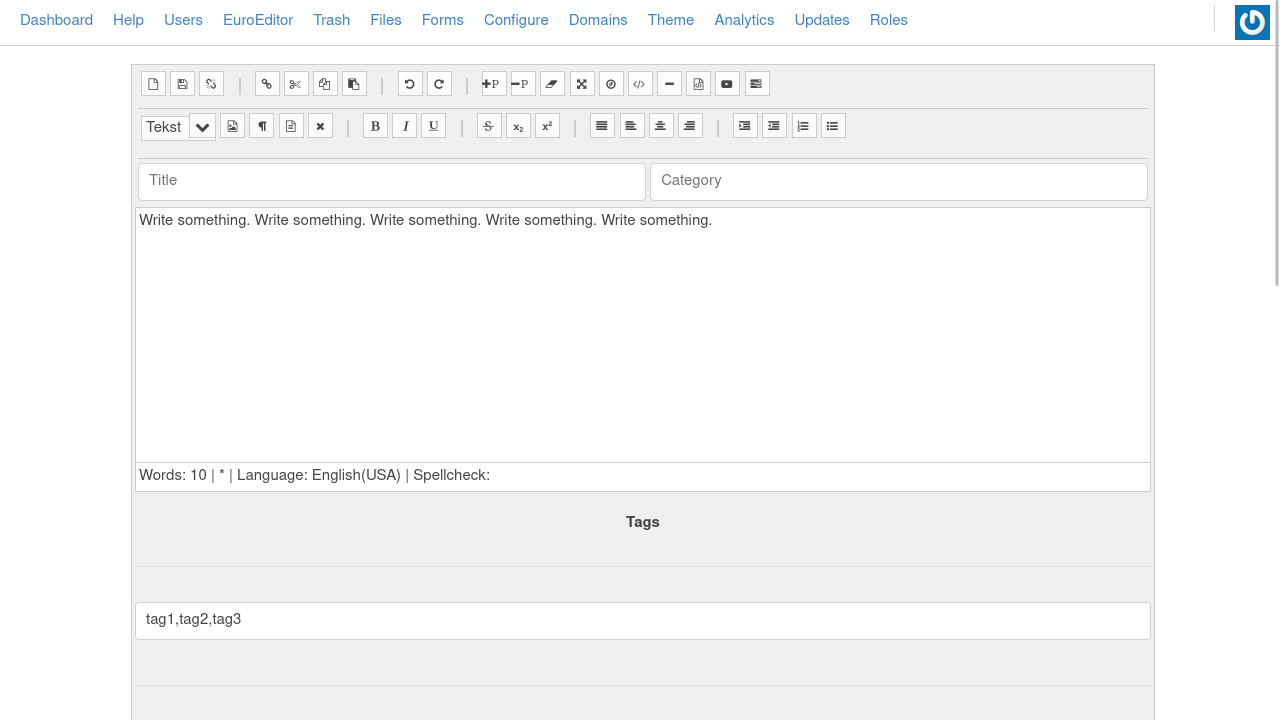
EuroEditor
Custom HTML Elements
To generate unique content on the front end, we will register a new HTML tag.
First, we need to register the new html elements via JS code, like so:
/*
	When the browser is done, loading, get the ecms tags
*/
class ECMSElement extends HTMLElement {
    connectedCallback() {
/*         this.innerHTML = `<h1>Hello World...</h1>`;
        this.style.color = "red"; */
    }
}

customElements.define('ecms-content', ECMSElement);

// https://developer.mozilla.org/en-US/docs/Web/API/Window/load_event
window.onload = function GetData() {
	const ecms = document.querySelectorAll('ecms-content');

	for (i = 0; i < ecms.length; i++) {
		console.log(ecms[i].dataset);
		alert(ecms[i].dataset);
	}
}
// Concept code. Later on, the ecms tag will be replaced with the requested content code.
// https://jsfiddle.net/blade1989/s81mr4gj/
HTML code
<!-- One generic EuroCMS tag? -->
<ecms-content data-file='007'></ecms-content>
<ecms-content data-toc></ecms-content>
<ecms-content data-form='789'></ecms-content>

<!-- Or per type of content?? -->

<!-- Files -->
<ecms-file data-fid='001'></ecms-file>

<!-- Table Of Content -->
<ecms-toc title="Table Of Content" data-collapse='true'></ecms-toc>

<!-- Forms?? This would work wonders for forms -->
<ecms-form title="Contact Form" data-form='789'></ecms-form>
Output
<h1 style="color: red;">Hello World...</h1>

<!-- ecms files -->

<a href="/files/image/png/file.png" title="file.png">
	<img src="/files/Thumbnail/png/w160-file.png" alt="file.png">
</a>


<!--

Things to remember

 - Lazy loading?
 - viewport loading at onload?

-->
HTML Global Attributes
The global attributes are attributes that can be used with all HTML elements.
| Attribute | Description |
|---|---|
| accesskey | Specifies a shortcut key to activate/focus an element |
| class | Specifies one or more classnames for an element (refers to a class in a style sheet) |
| contenteditable | Specifies whether the content of an element is editable or not |
| data-* | Used to store custom data private to the page or application |
| dir | Specifies the text direction for the content in an element |
| draggable | Specifies whether an element is draggable or not |
| hidden | Specifies that an element is not yet, or is no longer, relevant |
| id | Specifies a unique id for an element |
| lang | Specifies the language of the element's content |
| spellcheck | Specifies whether the element is to have its spelling and grammar checked or not |
| style | Specifies an inline CSS style for an element |
| tabindex | Specifies the tabbing order of an element |
| title | Specifies extra information about an element |
| translate | Specifies whether the content of an element should be translated or not |
Markdown editor
dependencie: https://cdnjs.cloudflare.com/ajax/libs/showdown/1.9.1/showdown.min.js
showdown.js:
// Simple
var converter = new showdown.Converter(),
    text      = '# hello, markdown!',
    html      = converter.makeHtml(text);

// -
// complex
var converter = new showdown.Converter(),
    MarkDownContent = document.getElementById("markdow").innerText;
    HTMLContent		= document.getElementById("html").innerHTML;

    ConvertedToMarkDown = converter.makeMarkdown(HTMLContent);
    ConvertedToHTML		= converter.makeHtml(MarkDownContent);

alert(ConvertedToHTML);
Reference
-
Custom html tags: jsfiddle.net/blade1989/s81mr4gj
-
BIdirectional markdown/html converter: https://jsfiddle.net/blade1989/qjd3rcx8/49/
-
https://www.w3schools.com/tags/tryit.asp?filename=tryhtml5_global_data
-
https://www.w3schools.com/jsref/met_document_getelementsbytagname.asp
-
https://www.w3schools.com/jsref/met_document_queryselectorall.asp